🚀 How to Set Up CI/CD Pipeline with GitHub Actions for Your Web App (2025 Guide)
Imagine pushing code to your repo… and bam! — it’s tested, built, and deployed automatically. That’s what CI/CD is for. And the best part? GitHub Actions is free for most teams and works straight from your repo.
🔧 What You’ll Need
Tool
Purpose
GitHub repo
Your code lives here
Hosting (like Vercel, Netlify, DigitalOcean)
Where your app gets deployed
SSH access or deploy token
For production deployment (if not using Netlify)
🧑💻 Step-by-Step: GitHub Actions for CI/CD
✅ Step 1: Create Workflow File
mkdir -p .github/workflows
touch deploy.yml
✅ Step 2: Add Your Workflow Script
name: 🚀 Deploy to Production
on:
push:
branches:
- main
jobs:
deploy:
runs-on: ubuntu-latest
steps:
- name: 🧹 Checkout Code
uses: actions/checkout@v3
- name: 🛠️ Set up Node
uses: actions/setup-node@v3
with:
node-version: '18'
- name: 📦 Install Dependencies
run: npm install
- name: 🧪 Run Tests
run: npm test
- name: 🚚 Deploy to Server
uses: appleboy/ssh-action@master
with:
host: ${{ secrets.SERVER_HOST }}
username: ${{ secrets.SERVER_USER }}
key: ${{ secrets.SERVER_SSH_KEY }}
script: |
cd /var/www/myapp
git pull origin main
npm install
pm2 restart app
🔐 Step 3: Set GitHub Secrets
Go to your GitHub repo → Settings → Secrets and Variables → Actions and add:
SERVER_HOST – your server IP
SERVER_USER – e.g. ubuntu
SERVER_SSH_KEY – your private key (no passphrase)
🎉 What Happens Now?
Any time you push code to main:
GitHub pulls code
Installs dependencies
Runs tests
SSH connects and deploys
💡 Bonus: Using Vercel or Netlify?
Even easier. Just connect your GitHub repo, and it auto-deploys on push. No SSH needed!
❓ Common Questions
🤔 What if my build takes too long?
Use actions/cache to speed it up. GitHub gives 2,000 free CI/CD minutes/month.
💥 What if my server has downtime?
Use PM2 or Docker rolling deployments for zero-downtime updates.
🛡️ Is GitHub Actions secure?
Yes — just store sensitive values using GitHub secrets.
🧠 TL;DR Summary
How do I set up CI/CD using GitHub Actions?
Create .github/workflows/deploy.yml
Add build + deploy steps
Use SSH action or connect to Netlify
Push code → auto-deploy. Boom. ✅
🧰 Need Help?
At Synapse Tech Solution, we help startups and dev teams:
Do You Really Need a Website for Your Business in 2025? Here’s the Honest Truth.
🤔 “Do I really need a website?”
If you’re a business owner still asking that in 2025… you’re not alone.
Maybe you’re killing it on Instagram. Maybe you get leads from WhatsApp or word of mouth. So you wonder — why bother with a website?
Let’s be real:
You don’t need a website to exist.
But if you want to grow, build trust, and stop relying on someone else’s platform — then yes, you absolutely do.
Let’s break this down, friend to friend 👇
🧃 You’re Renting on Social Media — A Website Is Your Real Estate
Running a business only on social media is like running a shop inside someone else’s mall. Looks good until the mall closes early, raises rent, or throws you out.
Instagram algorithm changes?
Facebook’s reach tanks?
Your content disappears.
With a website, you’re in control. It’s your space, your rules, your brand.
🧑💻 People Google You — They Don’t Search on Instagram
Ask yourself:
If you’re looking for a plumber, a designer, or a place to eat — do you go to Instagram first?
Nope.
You Google it.
So will your future customers.
And when they do… if your business doesn’t show up, you’re losing trust and sales.
📱 Even If You Use WhatsApp or DMs, Customers Still Want to “Check You Out”
We’ve all done it.
Before we hit “Order Now” or “Send Inquiry” — we check the website.
“Is this legit?”
“What’s their pricing like?”
“Can I see samples or testimonials ?”
No website = red flag 🚩.
Even a basic 5-page site builds credibility like nothing else.
🚀 A Website Grows With You (Even While You Sleep)
Unlike Instagram or a marketplace, a website doesn’t sleep, doesn’t crash, and doesn’t take commission.
Add a blog? Easy.
Sell digital downloads? Done.
Book appointments or run ads? Boom 🤯.
Think of it as your 24/7 sales machine — one that never asks for chai breaks.
💸 “But I Don’t Have Budget Right Now…”
Totally fair.
But guess what? You don’t need a ₹5 lakh site to start.
There are affordable options (like what we offer 😉), even for ₹25,000–₹40,000, that get your brand out there with style and speed.
And once you grow? Upgrade it. Add e-commerce. Scale it up ⬆️.
🙋 Still Not Sure? Here’s a Quick Quiz
Want more leads without boosting every post? 👉 Website.
Want to rank on Google and get found? 👉 Website.
Tired of answering “Can you send your work?” 👉 Website.
Want to look legit to investors or partners? 👉 Website.
If you said “yes” to even one…
You know what to do.
👊 Final Word — From One Hustler to Another
2025 is not the year to rely on platforms you don’t own.
It’s time to build your own home online — even if it starts small.
And hey, if you’re confused, overwhelmed, or not sure where to start… that’s literally what we do at Synapse Tech Solution.
How Much Does It Really Cost to Build a Custom ERP for SMEs in India?
If you’re running a small or medium business in India and are tired of juggling between Excel sheets, disconnected software, or rigid off-the-shelf solutions — a custom ERP (Enterprise Resource Planning system) might be just what you need.
But one question always comes up: “How much does it cost to build a custom ERP?”
Well, there’s no one-size-fits-all answer — but in this blog, I’ll break down real cost ranges, what drives the pricing, and whether going custom makes sense for your business.
🧾 So… What’s the Ballpark Cost?
A custom ERP system for Indian SMEs usually falls between ₹5 lakh to ₹50 lakh — depending on how complex your needs are.
Advanced ERP (custom workflows, integrations, scalable): ₹35 lakh and up
🎯 What Actually Impacts ERP Pricing?
Let’s go beyond the surface and see what really affects the cost:
1. Modules & Features
Do you need just inventory and billing? Or HR, finance, CRM, project management, and everything in between?
More modules = more time = more money.
2. Technology Stack
If you go with open-source stacks like Laravel + MySQL + React, it’s budget-friendly. But enterprise tools like SAP or Oracle will raise your costs due to licensing and complexity.
3. User Interface & Experience (UI/UX)
A clean, simple dashboard? Cool. A fully customized, high-end UI with animations? That’s gonna add to the cost — and rightly so.
4. Third-Party Integrations
You may need to plug in payment gateways, WhatsApp APIs, accounting tools like Zoho Books, or even a GST portal. Each integration might cost ₹50K to ₹3 lakh depending on the vendor and documentation.
5. Testing & Deployment
Don’t ignore the testing and QA phase — you’d rather pay now for good testing than later for bad bugs. Hosting, devops setup, and deployment also come with their own price tags.
📊 Quick Cost Breakdown (Estimated)
Item
Estimated Range
UI/UX Design
₹2–8 lakh
Backend Development
₹8–20 lakh
Frontend + Admin Panel
₹5–15 lakh
Integrations (API, payment, etc.)
₹2–10 lakh
Testing & QA
₹2–5 lakh
DevOps, Hosting, Domain Setup
₹2–4 lakh
Total
₹20–50 lakh (approx.)
🤔 Off-the-Shelf ERP vs Custom ERP – What’s Better?
Here’s a no-fluff comparison:
Feature
Custom ERP
Off-the-Shelf ERP
Cost
One-time (₹5–50L)
Ongoing (₹2k–₹10k/user/month)
Flexibility
Full customization
Limited
Scalability
Easily scalable
Can be restrictive
Ownership
You own it
You rent it
Tools like Zoho, Tally, or SAP Business One are great to start. But if you have unique processes or want control in the long run, custom ERP gives you a lot more room to grow.
💡 Real-World Tip
If your business is just starting out or has fewer than 10 employees, try an off-the-shelf tool for 6 months. Once you’ve figured out what works (and what doesn’t), that’s when custom ERP becomes worth it.
🔄 Common Questions (Answered Simply)
Q: Can I build an ERP under ₹10 lakh?
Yes — if you keep it lean with just core modules and a simple UI.
Q: How long will it take?
Usually 3–6 months for mid-size projects. Bigger systems take 6–12 months.
Q: Any hidden costs?
Sometimes yes — data migration, staff training, or post-launch support aren’t always included in the quote. Always ask for a detailed breakdown.
Q: What if I need changes later?
That’s where a good development partner helps — make sure they offer ongoing support.
🚀 Final Words
A custom ERP might sound like a big investment, but it’s exactly that — an investment. Not just software. It saves you time, fixes leaks in your workflow, and sets you up for serious scaling.
At Synapse Tech Solution, we’ve helped SMEs build custom ERP systems that are not only functional but flexible, user-friendly, and built to grow with them.
PHP, which is one of the most widely used programming languages offers a plethora of amazing features to the developers that enable them to write reusable and clean codes whilst achieving the faster development of web applications and websites. There are many PHP frameworks that carry PHP’s features like pre-build flexibility and ease of use with their own specific features to enable the developers to achieve better performance and efficiency. One of these frameworks is Laravel.
What Makes Laravel The Best Php Framework In 2018
Laravel is a contemporary, open-source and widely used web application framework using supporting quick and easy tailored web apps designing. Built-in 2011, the Laravel Framework is relatively new but it spans the depths & widths of a large-scale web app development. The Laravel ecosystem, right after its evolution has quickly developed into a colossal supportive community and offers an array of learning resources as well as free tutorials. It is one of the reasons that it is widely used by the PHP developers for shaping diverse web applications.
# – Template Engine
Laravel has an awesome built-in template engine that enables you to built amazing content using the dynamic content seeding. The template engine is the inbuilt lightweight engine that makes laravel superb to work with.
# – Artisan
To use the command line Laravel uses an artisan command-line tool which makes the tedious and repetitive work easy to work with. Artisan command-line tool can be used to create the database structure, the skeleton for controller and routes, build migration that makes very easy to manage. Artisan even helps developers to create their own commands and do convenient things with it.
# – Support To MVC Architecture
MVC or Model- View- Controller ensures the clarity between the logic and view. Laravel supports MVC Architecture which makes the laravel more efficient, easy to work with and better bonding between the logic and view.
Controllers to handle user requests and retrieve data, by leveraging Models
Models to interact with your database and retrieve your objects’ information
Views to render pages
# – Security
While developing any web application, every programmer in some way has to use some effective ways to make it secure. Laravel takes care of the web application security within its own framework. It uses hashed and salted passwords that means the password would never save as the plain text in a database. It also uses the “Bcrypt Hashing Algorithm” in order to generate an encrypted representation of a password.
# – Routing
With this framework, we can easily approach to routing. The route can be triggered in the application with good flexibility and control to match the URL. Again, since this is such a common scenario, you can define a single resource route, which creates routes for all of those resource controller actions. For more details, you can read the official documentation of here: Laravel Documentation
#- Modular Packaging System
Laravel is loaded with programming utilities to aid the process of web application development as well as moderation in the best possible way. It is packed with the unique Modular Packaging System (MPS) with a completely dedicated dependency manager.
#- Colossal Community Support
Laravel possesses huge community support. There are a plethora of online resources where one can find comprehensive learning guides and documentation to help the developers overcome any problem they are encountering with Laravel. There are innumerable resources that can be used by the developers to enhance their development skills and scope.
# Conclusion
There are some other features as well. For example, Queue and Task Scheduling, Request Object, Laravel Socialite, Commands, etc. Laravel 6 has improved a lot from an architectural perspective. It also works seamlessly for code organization and maintenance. If you are ready to work with you can find the tutorial to Install the Laravel here.
How to Use Laravel To Build Legendary Web Applications
How to Use Laravel To Build Legendary Web Applications:– Taylor Otwell created Laravel to be an open-source PHP Framework for awesome web application development. The main motive behind the creation of Laravel was to have the simplicity and features of other languages like Python and Ruby On Rails. While Laravel is booming day by day it has some awesome features or we might call them “Killer Tools” that makes working with Laravel a charm. In this article, we are going to list some of the Killer Tools Of Laravel which will make your web development process a cakewalk.
Awesome Tools Of Laravel For Awesome Web App Development
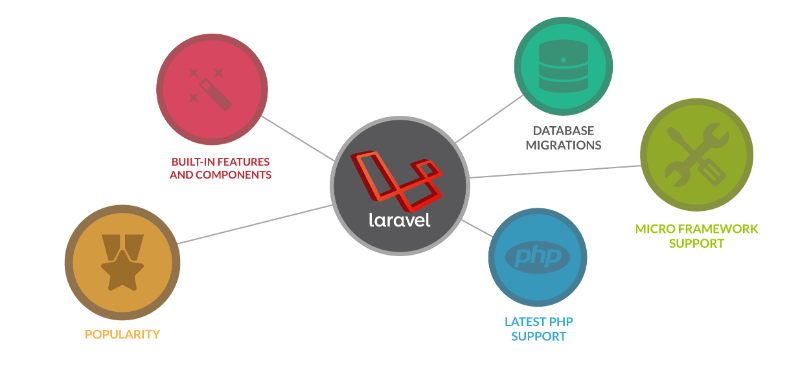
Laravel
# -Eloquent ( ORM | Inbuilt | Free )
Eloquent is an ORM (Object-relational Mapping) that is a programming technique that helps in converting data between incompatible type systems into object-oriented programming languages.
# — Artisan ( Command Line | Inbuilt | Free )
Laravel has an inbuilt lightweight command-line tool known as Artisan. Using artisan you can create Database Structure, Run migrations, find the relations between the routes, can create repetitive things easily like creating Controller, routes, Models, etc.
# — Blade Engine ( Template | Built-in | Free )
It is based upon the Model -View- Controller architecture. The blade engine of Laravel serves as a cross between the syntax of Twig and .NET’s Razor template. This benefits the developers as they can simply create small yet expressive templates.
# — Valet ( Development Tool | Install | Free )
Valet is a Laravel development environment for Mac minimalists. No Vagrant, no /etc/hostsfile. You can even share your sites publicly using local tunnels. Yeah, we like it too.
Laravel Valet configures your Mac to always run Nginx in the background when your machine starts. Then, using DnsMasq, Valet proxies all requests on the *.test domain to point to sites installed on your local machine.
# — Homestaed( Development Tool | Install| Free )
Just Like Valet which is for Mac, Homestead is the development environment that comes in handy as Laravel requires you to work locally. Windows users who face some friction homestead comes in for there rescue.
# — Elixir ( Front End Build | Inbuilt | Free )
Laravel Elixir provides a clean, fluent API for defining basic Gulp tasks for your application. Elixir supports common CSS and JavaScript pre-processors like Sass and Webpack. Using method chaining, Elixir allows you to fluently define your asset pipeline.
Working with Hosting providers like aws ,digital Ocean sometimes becomes a pain so Using Forge you can Choose between AWS, Digital Ocean, Linode, or even your own custom VPS. These are your servers, Forge just make it working them easy like Sunday morning.
# Conclusion
That’s was a quick glance at some of the add-ons and components that are popular in this ecosystem. Although there are a plethora of other Tools and Features that waiting to be explored. Hopefully, that clears a few unclear things. For more details, you can read the official documentation of here: Laravel Documentation . If you are also looking to build a legendary application for your business then Synapse Tech Solution which is Best eCommerce Development Company for all your Web Development needs. Just leave your queries at [email protected]
Woocommerce Vs Magento 2020 - What to Choose?
Woocommerce Vs Magento 2020 — Which is Better For You:-If you want to start a new business or a new and inspiring developer who is looking for any CMS to learn than two very famous platforms come into the mind of each and every one of you. In order for you to make a choice between these, we are going to help you dissect each and every point between Woocommerce Vs Magento. So let’s start
Magento is an open source e-commerce platform tailored to web development professionals, and medium to large online stores. It offers one of the most robust feature sets in the field, which makes it ideal for stores with high aspirations.
Magento is being touted as one of the best eCommerce platforms to work upon. With more then 125000 and Fortune 500 companies website under its belt, it is one of the most promising platforms to build websites upon. Some of the features of the Magento includes:-
-> Feature Rich:- Community version which is free to use is loaded with lots of features and services. multiple storefronts, multi-language and multi-currency support are some of the awesome features included into the Magento Community version.
-> Cost:- As I told you above that the Community version of Magento is free to use while the enterprise edition is costly.
-> Community:- The community area of Magento is wide and diverse including developers who have developed an extensive range of Plugins and themes.
-> Scalable:- Wheather you are selling 20 products or 20000 Magento can handle it easily. Magento is very scalable.
WooCommerce is a powerful plugin for the WordPress platform. It offers all the features you need from an e-commerce solution, while retaining the ease-of-use of its parent platform.
->Features with Added Benefits:- As WooCommerce is a plugin for WordPress so you can enjoy all the benefits of WordPress in your eCommerce.
->Cost:- Using WooCommerce does not go to cost you a dime as it is a free plugin to choose from so you don’t have to worry about the Costing while using WooCommerce.
-> Community:- The community size for WooCommerce is very large as it comes with WordPress so there are plenty of developers for WordPress so you can work easily among the community size.
-> Added Features:- WooCommerce supports multiple payment methods that can be added to the store. Some of the most popular payment methods supported by WooCommerce include cash payments, Mastercard and Visa, and Paypal. Aside from just e-commerce features, WooCommerce features all the necessary SEO functions that you need to promote your website. Whatever SEO functions your WordPress has can be accessed in your WooCommerce.
Woocommerce Vs Magento 2018 Comparison List
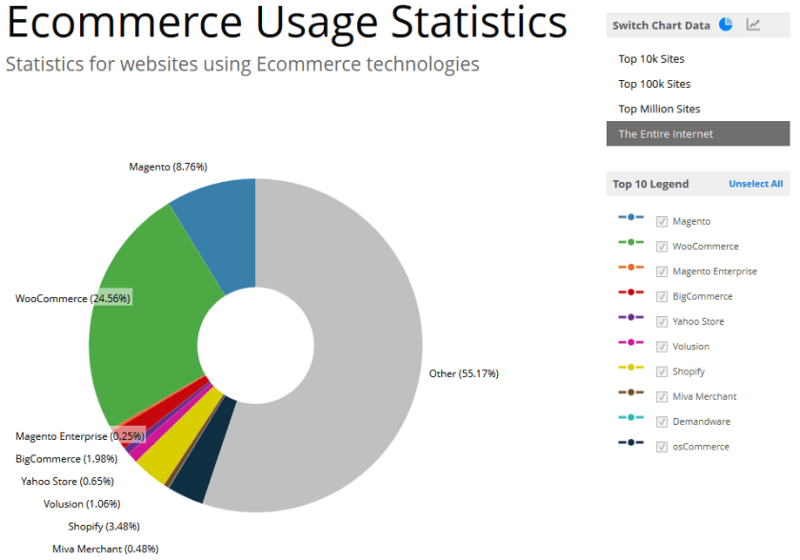
Ecommerce Usage Statistics
1) Difference based on Programming Language: WordPress is an open-source blogging tool that has its programming contained within a set of sequenced PHP scripts while Magento is specifically developed for e-commerce and is object-oriented.
2) Security: Magento is also more secure as it uses many security patches than using WordPress third party plugins. But using the Magento security patches can sometimes be very tricky for a normal to the user to apply.
3) Development Scenario: Magento files are set up across a number of files and folders that share the same name. Where in WordPress all the files are largely contained within the same folder but have a unique naming convention.
4) E-commerce Plugins: Magento being object-oriented was developed specifically for eCommerce. Just by navigating through the Magento Admin Panel, you’ll notice that an overwhelming majority of it is devoted to eCommerce capabilities like shipping options, payment integration, inventory, price management, gift cards, or order fulfillment whereas for WordPress e-Commerce plug-ins features are limited and are not that much diverse an of Magneto.
5) Based on Selling of products: If the sole purpose of your website is for blogging and content management and you are not intended to sell more than 10 to 1000 products then the suitable platform for you is WooCommerce whereas if your goal is to sell products, then using Magento is highly recommended.
#Conclusion
Both of these platforms have their own respective purposes, so it’s very hard to conclude which one is really the best. If you are looking at owning a small business that can grow at a steady pace and with a smaller budget, then you might want to go for WooCommerce. WooCommerce was designed for startup shops where owners don’t have that much knowledge when it comes to web development.If you already own an existing brand or if you’re working for a rather big firm with high sales per month, then Magento is for you. Magento is also good for clients that have bigger budgets as they can fully experience the power of Magento by being able to buy all the great features. In case you are looking for Top Web Development Company In Delhi NCR then Synapse Tech Solution is your one-stop destination for all your Web Development needs. Just leave your queries at [email protected]
Top 4 PHP Framework in 2019 For Beginners
With the year 2019 coming to end, Web development is still raging in the IT field. Although Mobile applications have taken in place of the web-based application still the time for web development is still going to roar for some more time as we know. But for new graduates or people starting in the web development, PHP is the Go-To language as it doesn’t require much hard work and many low-level developers are still working on the PHP. Python is also easy to learn but PHP had covered a lot of market area and that’s why it’s still gaining popularity and is among the top web language and is gaining popularity among the Top Web Development Company In Delhi NCR. Today, we are going to cover top 4 PHP framework in 2019, these PHP frameworks will not only help you gain exposure to the latest framework but you can start learning any one of them and increase your knowledge base, So let’s start:-
1. Laravel
Laravel was introduced by Tylor Otwell In 2011 and is among one of the hottest PHP frameworks in the market. Laravel is a free, an open-source framework supporting MVC architecture. Recently, its version 6 was introduced which has brought many great features and has made work of developer very easy. Using Laravel, a developer doesn’t have to focus on other stuff like Authentication, Authorisation, Security, etc. but has to focus on only one thing that is to build new awesome applications.
2.Codeigniter
Codeigniter is also open, free-source PHP framework introduced in 2006 by the British Columbia Institute of Technology. Codeigniter One of the hottest thing about the Codeigniter is that it has a very small footprint size. Full installation of the Codeigniter is just about 2MB. Codeigniter also loads very fast, has excellent documentation and based on MVC architecture.
3. CakePHP
CakePHP was introduced to make maintenance and development of PHP code very easy. CakePHP made the development of PHP very easy and provided more control on database and SQL queries. CakePHP supports PostgreSQL, SQLite, MySQL, and PEAR-DB. Using CakePHP developer can make search engine friendly URLs.
Yii is an open-source, fast, Object-oriented framework. It has used the latest Php features like Traits and namespace. Yii also supports MVC pattern and is made very secure form the external threats. This one also has an automatic code generation tool which will help you get started easily.
These are just some of the frameworks of PHP which are currently hottest in the market. If you are looking for getting your work done in any one of the above framework, you can definitely go with the best Web Development Company In Delhi NCR which is Synapse Tech Solution. We are one of the top emerging IT company in the field of IT Sector.